
1
1. Diffusion
Vibration disperses randomly piled parts (table specification can be customized)
A desktop system for automatic picking and alignment of randomly placed micro parts
Vibration disperses randomly piled parts (table specification can be customized)
Image processing identifies position and shape
Touch function + ultrasonic motor provide stable gripping
Picking camera confirms operation video
AVW removes tip adhesion for accurate transfer
High-precision alignment to fixed position and orientation (tray can be customized)
For chip parts, MPPS runs a 6-step sequence from diffusion to alignment, reducing mis-picks, orientation errors, and residual sticking at the same time.
Vibration disperses randomly piled parts (table specification can be customized)
Image processing identifies position and shape
Touch function + ultrasonic motor provide stable gripping
Picking camera confirms operation video
AVW removes tip adhesion for accurate transfer
High-precision alignment to fixed position and orientation (tray can be customized)
Pins are separated and dispersed by vibration
Image processing identifies position and posture
Ultrasonic motor gripper performs picking
Place once on jig, then re-grip at proper position
After AVW removal, align pins (or insert to jig when needed)
For pin parts, MPPS adds horizontal correction and re-gripping to stabilize posture of thin/long workpieces before final alignment or insertion.
Pins are separated and dispersed by vibration
Image processing identifies position and posture
Ultrasonic motor gripper performs picking
Place once on jig, then re-grip at proper position
After AVW removal, align pins (or insert to jig when needed)

Overlapping Pins
(Re-grip even if not overlapping)
TGH-1011
Functions
TGH-1021
Functions
TGH-1031
Functions
| Tact Time | Avg. 6 sec / part |
| X Axis | Stroke: 250mm / Resolution: 0.1μm |
| Y Axis | Stroke: 100mm / Resolution: 0.1μm |
| Z Axis | Stroke: 100mm / Resolution: 0.1μm |
| θ Axis | Stroke: 180° / Resolution: 0.0024° |
| Part Recognition Camera | 4000×3000 px (Color) / FOV: 30×30mm |
| Picking Camera | 1312×816 px (Color) / FOV: 40° |
| Gripper | Max opening: 5mm / Thrust: 35-90g / Hold: 150g |
| Compatible Chip Parts | 0402 and above |
| Power Supply | AC 90-200V / 2A |
Micro parts can cling to gripper tips due to Van der Waals force — neither magnetic nor electrostatic, but powerful at micro scale. The AVW unit eliminates this adhesion, enabling accurate transfer and alignment.
View AVW Unit Product Page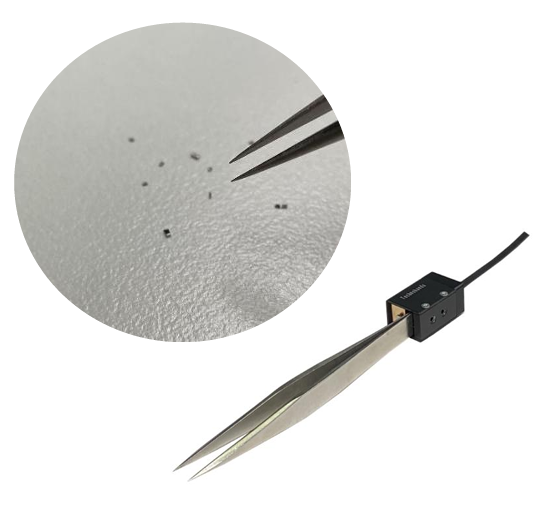
Catalog Download